


Tip: Create Google Docs Templates from your forms
The step by step guide
Automation is the key to saving time and improving efficiency in your daily work. With No-code tools, it is possible to create automated processes without writing a single line of code.
Today we show you how to create Google Docs templates from Google Forms using Zapier.
Follow our guide in 5 simple steps and transform your way of working!

Step 1:Create your final document
Start by creating the end document you want to generate automatically. This document must contain all the fields to be completed. For example, if you create a contract, include fields for the name, address, terms of the contract, etc.

Step 2: Create your Google Forms questionnaire
Create a questionnaire in Google Forms, adding a question for each field you have included in your final document. Each response of this form will automatically feed the fields of your Google Docs model.

Step 3: Prepare your Google Docs model
Reuse the fields in your Google Forms in the Google Docs model using double hugs "{{ }}" around the field titles. For example, {{Name}}, {{Address}}, etc. Next, create a model of your Google Docs to connect to Zapier.

Step 4: Configure automation in Zapier
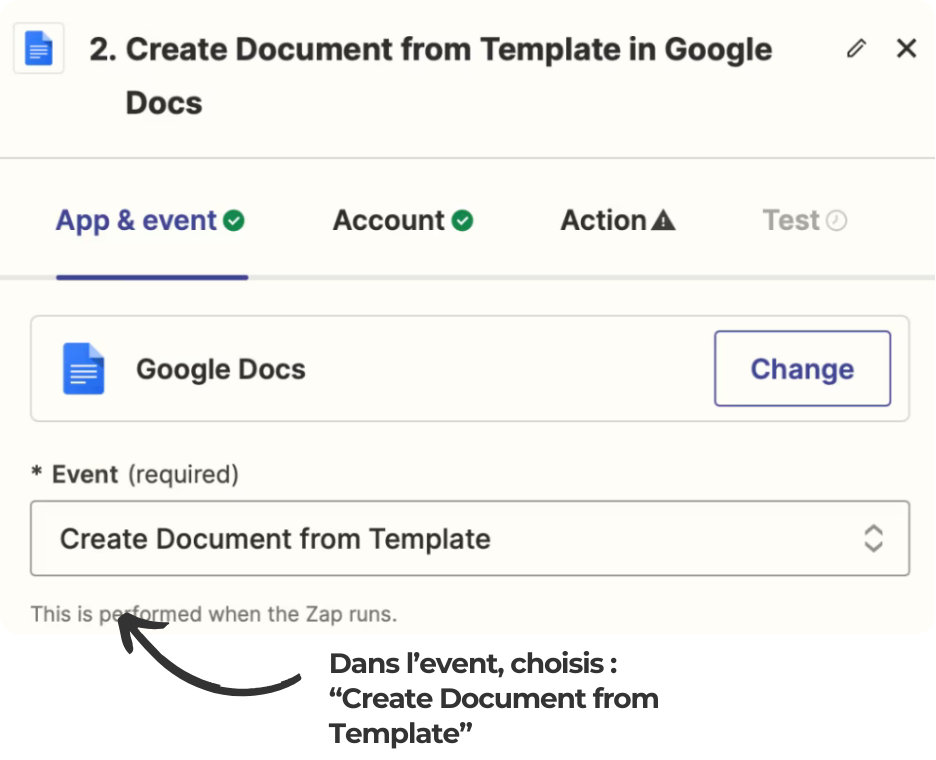
In Zapier, create a new event by choosing "Create Document from Template". Configure automation by connecting your Google Forms and Google Docs account to Zapier.
Step 5: Match the fields and test
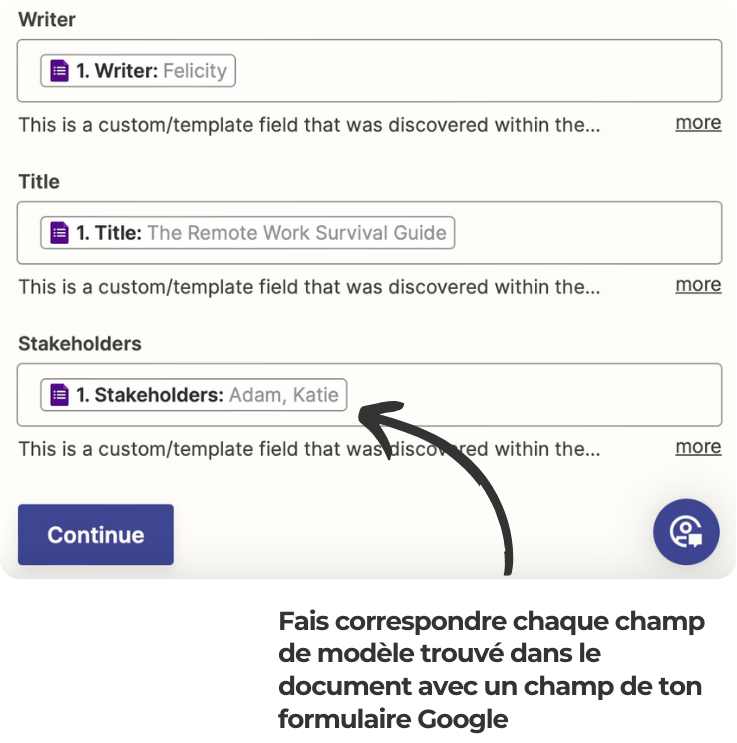
Be sure to match each field of the template in Google Docs with the fields on your Google form. Perform a test to verify that your Zap is working properly and that the fields are filled in as expected.
In summary
By following these 5 steps, you can automate the creation of Google Docs documents from Google Forms, saving valuable time and reducing manual errors. Take advantage of the power of no-code tools to simplify your processes and increase productivity.
Ready to transform the way you work with no-code tools?
Contact us today to find out how we can help you integrate custom automation solutions.
Together, simplify your processes and boost your efficiency!

the most common questions
Automating document creation from Google Forms saves time and reduces human error. Using this method, you can automatically generate custom documents without having to manually enter the data. This improves the efficiency and productivity of your team, while ensuring consistency and accuracy of information.
Zapier is a no-code automation platform that allows you to connect different applications and automate workflows. Using Zapier, you can easily integrate Google Forms and Google Docs to automate document creation. Zapier simplifies the process by enabling code-free configurations, making automation accessible even to people without technical skills.
Yes, it is quite possible to customize Google Docs templates to meet various needs. Whether you need to create contracts, reports, invoices, or any other type of document, you can adjust the fields and format of your template accordingly. The use of the double hugs "{{ }}" around the field titles allows easy and flexible customization.
Match each field of the Google Docs template with the corresponding form question, then run a test in Zapier: the generated document should contain all the answers in the right places.



